WeChat Setup and Use Guide

A first-time visitor guide to creating a WeChat account, enabling Weixin Pay, completing identity verification, and using WeChat for payments and daily travel.

Guide Steps
  1. 1. I. Download and Install WeChat
  2. 2. II. Important Information Before Registration: How to Choose a Verification Method
  3. 3. III. WeChat Registration Process
  4. 4. IV. Enable Weixin Pay Payment Code
  5. 5. V. Is identity verification mandatory?
  6. 6. VI. Differences Between Unverified and Verified Accounts
  7. 7. VII. Weixin Pay Identity Verification Process
  8. 8. VIII. Rate Information
  9. 9. IX. Payment Limit Explanation
  10. 10. X. Paying with Weixin Pay
  11. 11. Method 1: Scan the merchant’s QR code to pay
  12. 12. Method 2: Show Your Payment Code to the Merchant for Scanning
1

I. Download and Install WeChat

You can find the official download links on our WeChat app page, or download WeChat from your phone's app store. Use the official publisher page and avoid unofficial installation packages.

After installation, open WeChat and begin the registration process.

2

II. Important Information Before Registration: How to Choose a Verification Method

During registration, the system may prompt you to select a security verification method. Your choice will affect whether you’ll need to complete Weixin Pay identity verification separately later.

If your goal is simply to complete WeChat registration first, choose Verify via Payment Card. If you wish to enable full Weixin Pay functionality in one step, we recommend selecting Verify and Activate Weixin Pay instead.

OptionDescriptionSubsequent Impact
Verify via Payment CardComplete registration verification using a bank cardAllows you to finish registration, but you may still need to undergo separate identity verification later to access full Weixin Pay features
Verify and Activate Weixin PayVerify and activate Weixin Pay directly during registrationIdeal for users who want full payment functionality immediately; typically eliminates the need for additional identity verification later
Verify via QR scan by another userVerification assisted by a QR code scan from another registered userSuitable when bank card verification isn’t possible, but functionality and payment capabilities may remain limited

Recommendation:

If you plan to use Weixin Pay long-term or wish to access its full range of features—including payments, money transfers, red envelopes, and wallet balance—we recommend selecting Verify and Activate Weixin Pay during registration.

If you instead select Verify via Payment Card during registration, you may still complete registration first and perform identity verification later as needed.

3

III. WeChat Registration Process

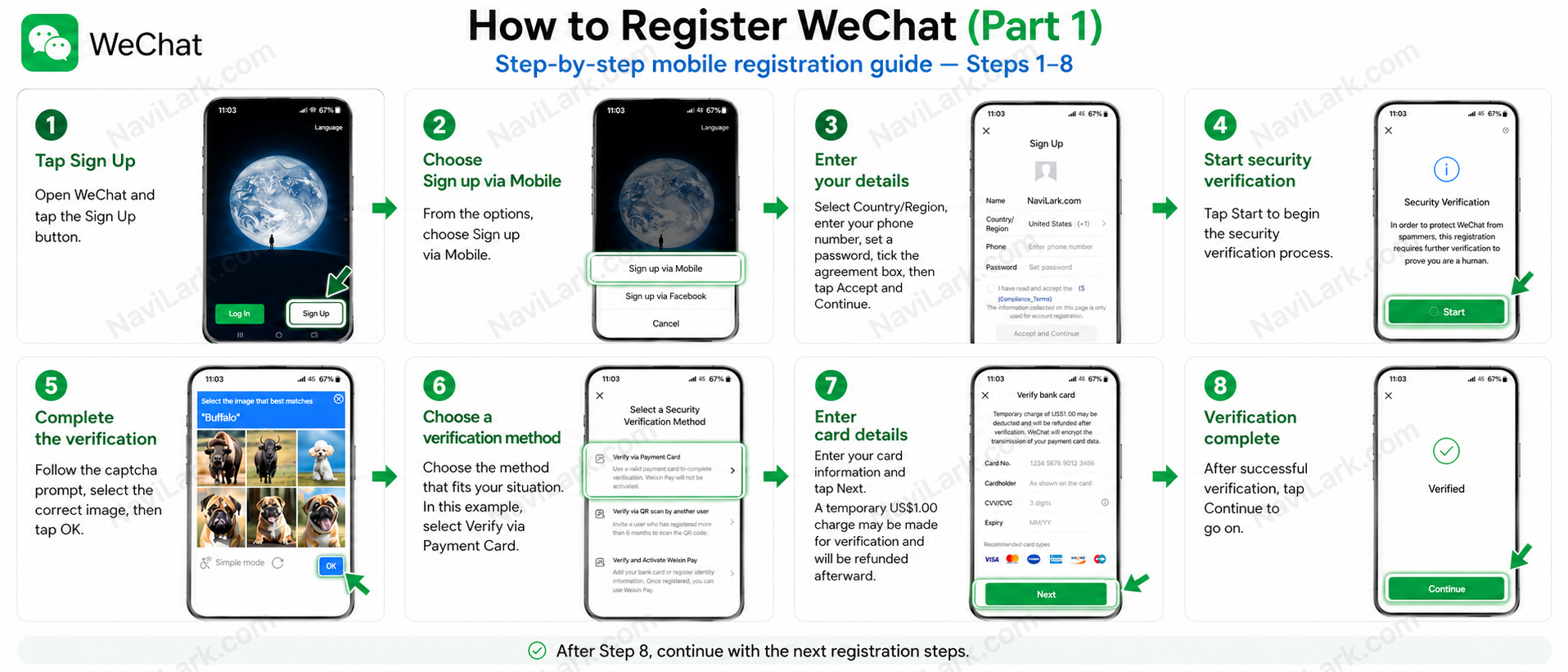
WeChat Registration Process Part 1, Steps 1–8
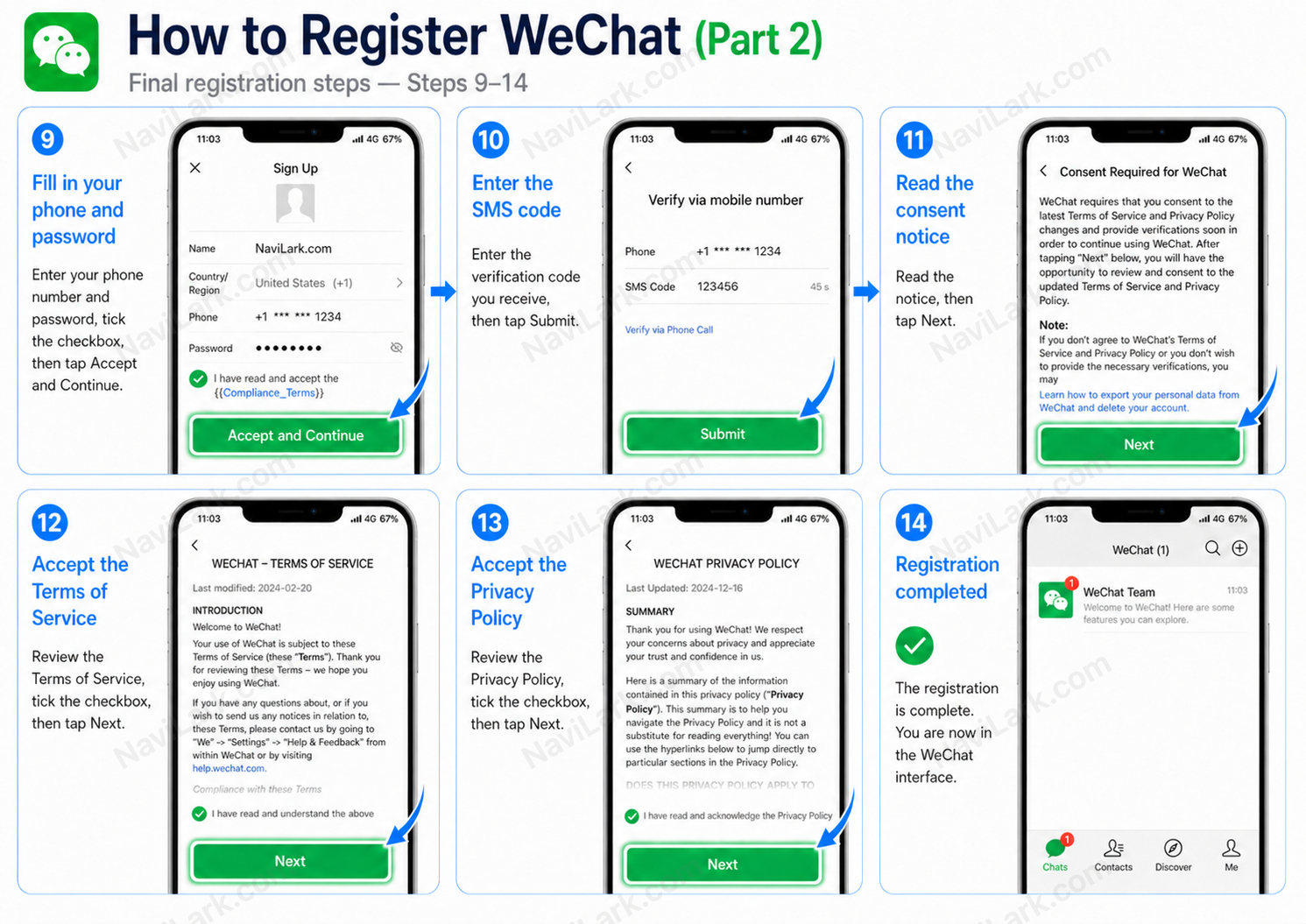
WeChat Registration Process Part 2, Steps 9–14

The registration process is as follows:

  1. Open WeChat and tap Sign Up.
  2. Select Sign up via Mobile.
  3. Enter your name, country/region, mobile number, and password.
  4. Review and accept the terms by checking the box, then tap Accept and Continue.
  5. Tap Start to complete the security verification.
  6. Select a verification method based on your situation—for example, Verify via Payment Card.
  7. Enter your bank card details and tap Next.
  8. After successful verification, tap Continue.
  9. Enter the SMS verification code sent to your mobile number and tap Submit.
  10. Follow the on-screen prompts and tap Next.
  11. Read and accept the relevant terms by checking the box, then tap Next.
  12. Upon completion of registration, you’ll be taken to the WeChat home screen.

Note:

If you use a bank card for verification during registration, the system may initiate a temporary verification charge (e.g., USD 1.00). This amount is typically refunded after verification is complete, though the actual processing depends on your bank and the platform.

4

IV. Enable Weixin Pay Payment Code

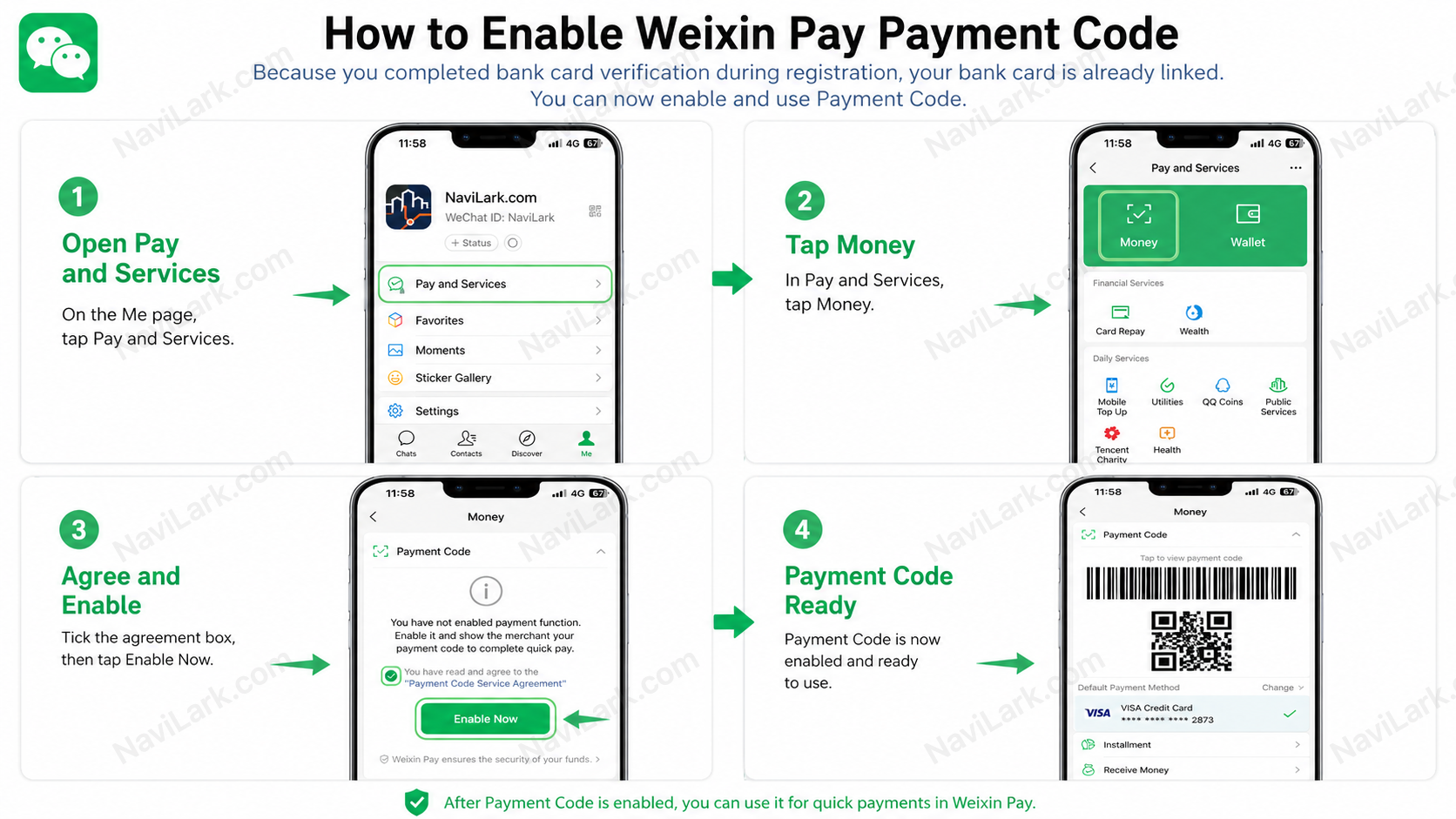
Weixin Pay Payment Code Flowchart

Procedure:

  1. Navigate to the Me tab in WeChat.
  2. Tap Pay and Services.
  3. Tap Money.
  4. On the Payment Code page, select the agreement.
  5. Tap Enable Now.
  6. Once enabled, your Payment Code will be displayed.

After enabling your Payment Code, merchants can scan your payment code using a scanning device to complete the payment.

5

V. Is identity verification mandatory?

Registering a WeChat account does not necessarily require users to complete full identity verification immediately. Users can first complete basic registration and then decide whether to proceed with Weixin Pay identity verification based on their usage needs.

However, if you wish to access more comprehensive Weixin Pay features or qualify for higher payment limits, we recommend completing identity verification.

Unverified accounts are not entirely barred from using payment functions, but their functionality and transaction limits will be restricted. Once identity verification is completed, your account will offer more complete features and is better suited for long-term use.

6

VI. Differences Between Unverified and Verified Accounts

FeatureUnverified UsersVerified Users
Basic PaymentsAccess to limited basic payment featuresAccess to a broader range of payment features
Merchant QR Code PaymentsTypically suitable for small-value transactionsSupports higher transaction limits and more stable usage
Payment LimitsLowerHigher
Money TransfersMay be restricted or unavailableGenerally supports full functionality
Red EnvelopesMay be restricted or unavailableGenerally supports full functionality
Wallet Balance FeaturesMay be restrictedFull functionality available
Recommended ForUsers making simple, low-value purchases onlyUsers who frequently use Weixin Pay and require full wallet functionality

Key Notes

Unverified users are generally better suited for temporary, low-value, and basic payment scenarios.

If you plan to use Weixin Pay regularly—or need features such as money transfers, red envelopes, wallet balance, or account balance—we recommend completing identity verification.

7

VII. Weixin Pay Identity Verification Process

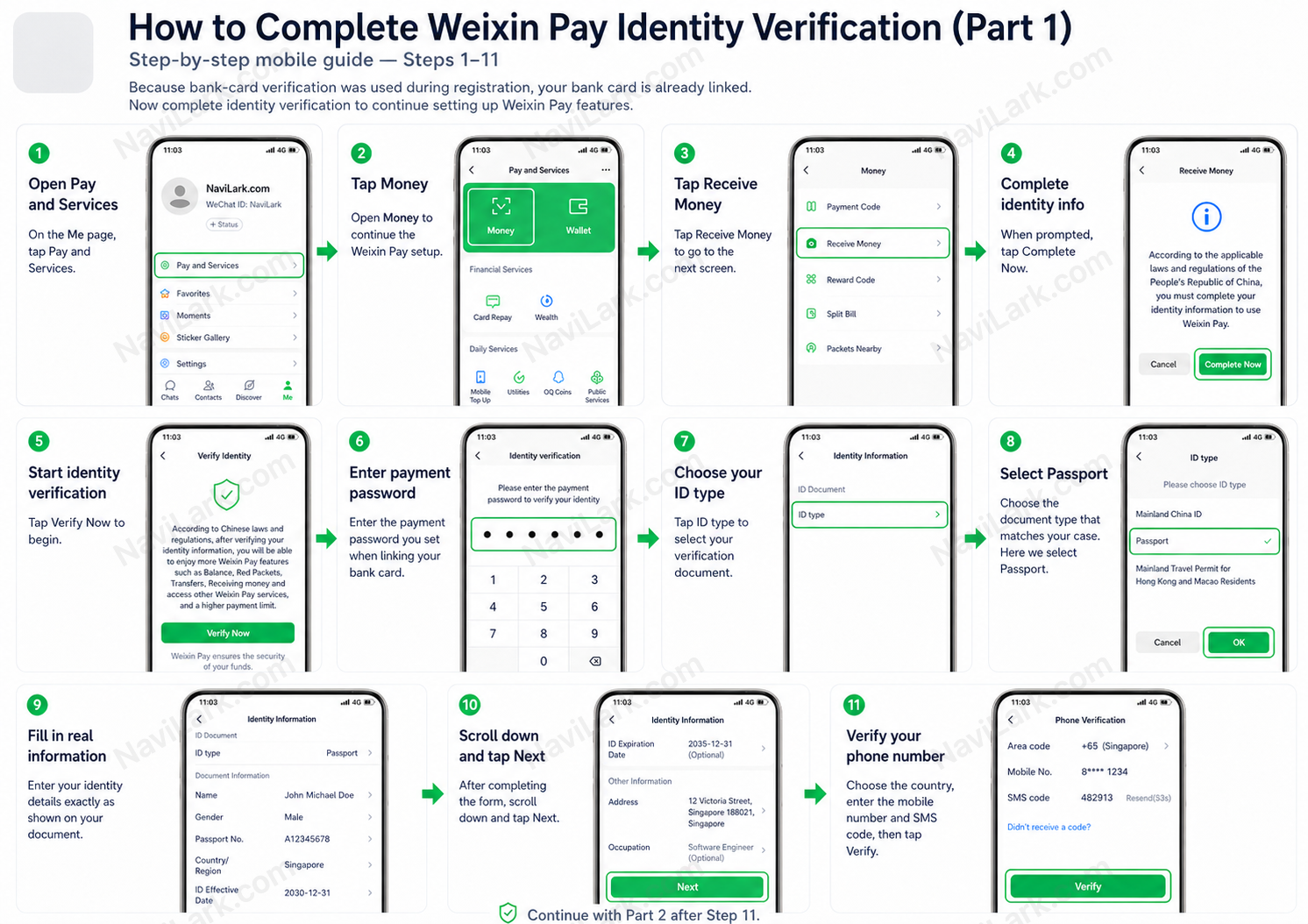
WeChat Pay Identity Verification Part 1, Steps 1–11
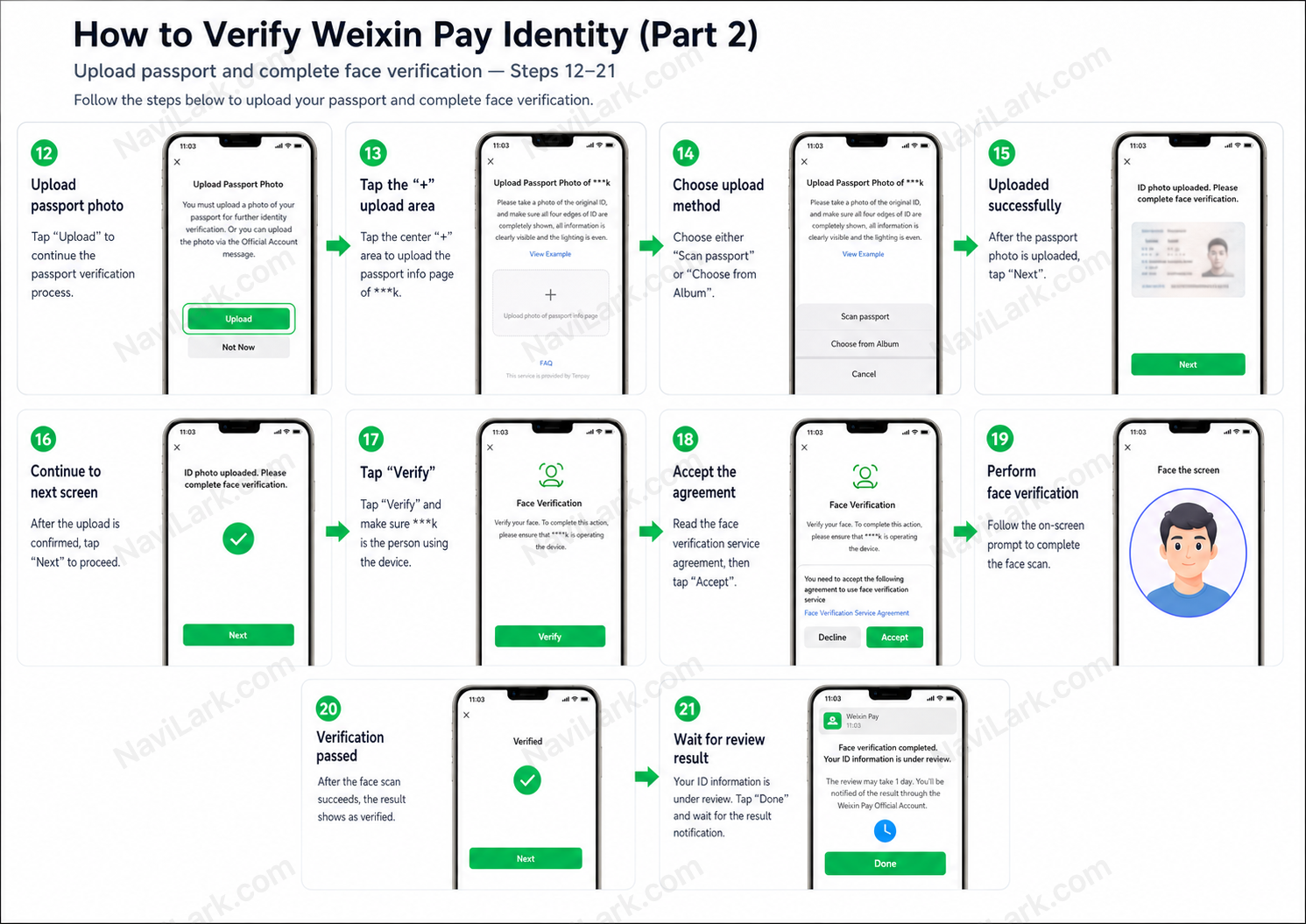
WeChat Pay Identity Verification Part 2, Steps 12–21

The identity verification process is as follows:

  1. Navigate to the Me page and tap Pay and Services.
  2. Tap Money.
  3. Tap Receive Money.
  4. Tap Complete Now as prompted.
  5. Tap Verify Now.
  6. Enter the payment password you set when binding your bank card.
  7. Tap ID type.
  8. Select your ID type (e.g., Passport).
  9. Enter your real identity information.
  10. After completing the form, tap Next.
  11. Select your country/region, enter your phone number and verification code, then tap Verify.
  12. Tap Upload to upload a photo of your passport.
  13. Choose to either take a new photo of your passport or select one from your gallery.
  14. After uploading, tap Next.
  15. Follow the on-screen instructions to complete Face Verification.
  16. Tap Verify.
  17. Read the terms and tap Accept.
  18. Complete facial recognition as instructed on screen.
  19. Once Verified appears, proceed.
  20. On the final screen, your information will show as “under review”; tap Done.
  21. Wait for official notification from Weixin Pay regarding the verification result.

Important Notice:

Your identity information must be truthful, accurate, and consistent with the details on your identification document.

Inconsistencies in name, ID number, country/region, or ID photo may result in verification failure.

8

VIII. Rate Information

The transaction fee rules are the same regardless of whether your account has completed identity verification. The main differences between verified and unverified users lie in available features and payment limits—not in the fee rates.

Transaction Amount per OrderFee Rate
≤ RMB 2000%
> RMB 2003%

Actual rates may vary depending on your region, account status, card type, transaction scenario, or platform policy updates. Please refer to the rates displayed on the Weixin Pay page for the most accurate information.

9

IX. Payment Limit Explanation

Quota for Verified Users

TypeQuota
Per TransactionUSD 5,000
Annual CumulativeUSD 50,000

Payment Limits for Unverified Users

TypeLimit
Per Transaction¥6,500
Annual Aggregate¥65,000

The credit limit may vary depending on factors such as your account status, risk control measures, linked bank cards, and regional policies. The actual available limit is subject to the amount displayed on the Weixin Pay page.

10

X. Paying with Weixin Pay

WeChat Pay offers two primary payment methods:

  1. Scan the merchant’s QR code to pay.
  2. Show your Payment Code to the merchant for scanning.
11

Method 1: Scan the merchant’s QR code to pay

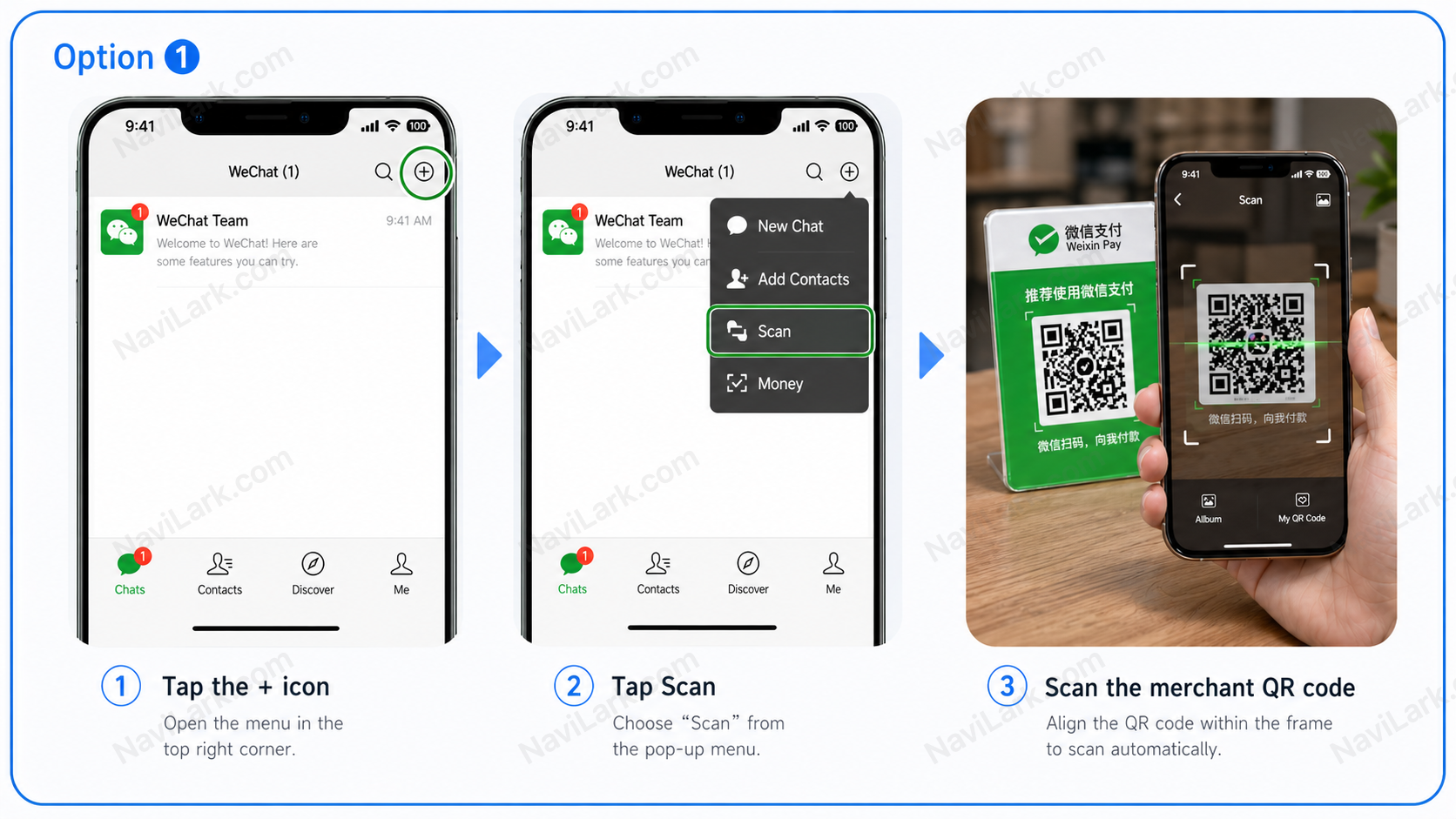
WeChat Pay Tutorial – Option 1: Scan the Merchant’s QR Code

Procedure:

  1. Open the WeChat home screen.
  2. Tap the + icon in the top-right corner.
  3. Select Scan.
  4. Position the merchant’s QR code within the scanning frame.
  5. Once recognized by the system, confirm payment as prompted on the screen.

This method is suitable when the merchant provides a QR code.

12

Method 2: Show Your Payment Code to the Merchant for Scanning

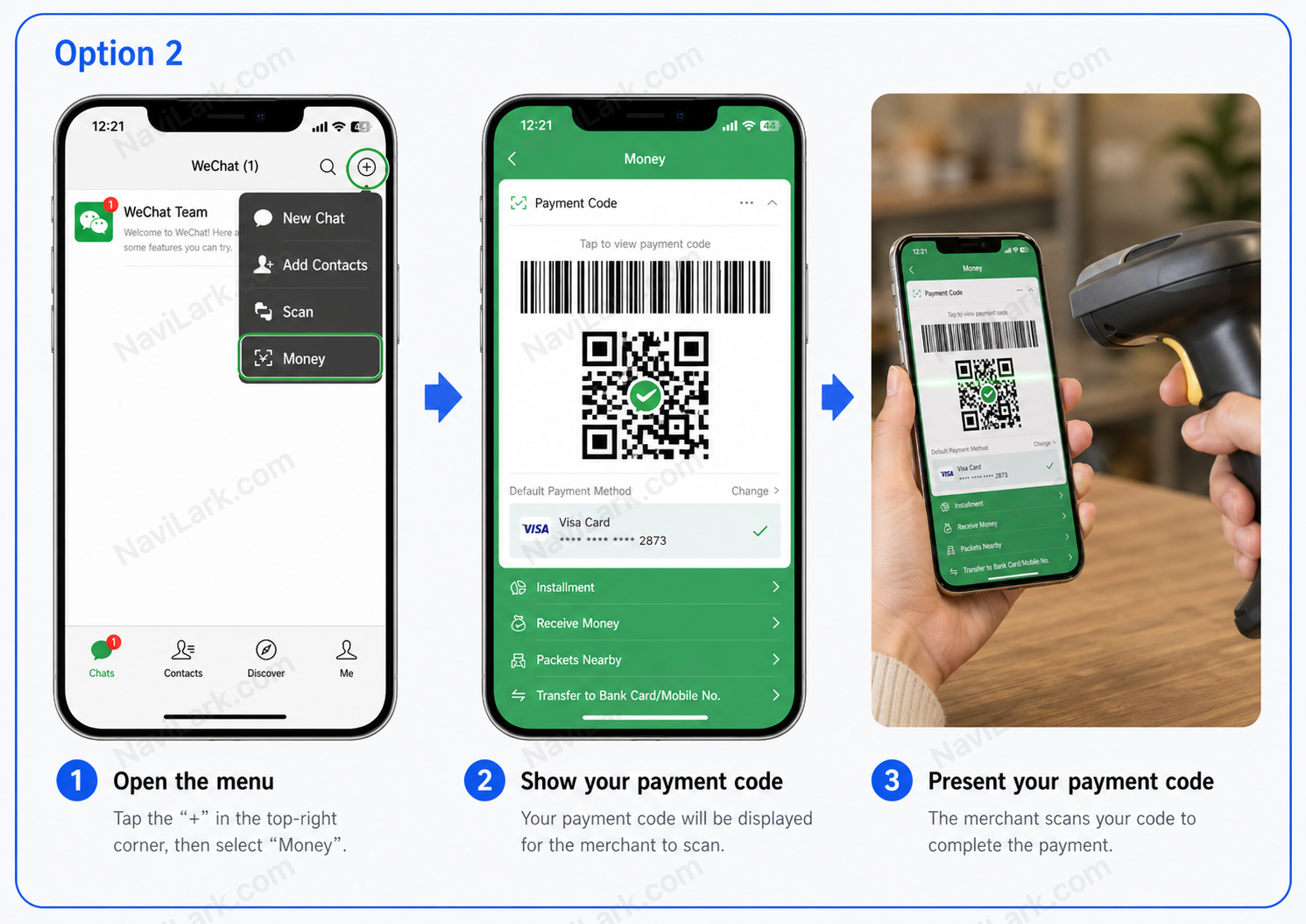
WeChat Pay Tutorial Option 2 — Present Payment Code

How to pay:

  1. Open the WeChat homepage.
  2. Tap the + icon in the top-right corner.
  3. Select Money.
  4. Your Payment Code will appear on screen.
  5. Show your phone screen to the merchant.
  6. The merchant scans your payment code using a QR code scanner to complete the payment.

This method is suitable for locations equipped with QR code scanners, such as convenience stores, supermarkets, and restaurants.

Safety Reminder:

Payment Code serves as your payment receipt—do not take screenshots or share it with others, nor display it in untrusted environments. After completing payment, please verify the transaction amount promptly.