
For an overview of DiDi and its download links, see our DiDi app page.
The images below show DiDi’s English interface. Select an image to view it at full size. Button names may vary by app version.

Learn how to register for DiDi, add a bank card and book a ride in China, with illustrated instructions for the app and its WeChat and Alipay mini programs.
For an overview of DiDi and its download links, see our DiDi app page.
The images below show DiDi’s English interface. Select an image to view it at full size. Button names may vary by app version.
Use the DiDi Mini Program in WeChat or Alipay
If you already use WeChat or Alipay, its DiDi mini program is a convenient option: you can book a ride without installing a separate DiDi app. Search for DiDi in the app you use and follow the account and payment prompts. The two images below show the standalone app and the mini program entry points.
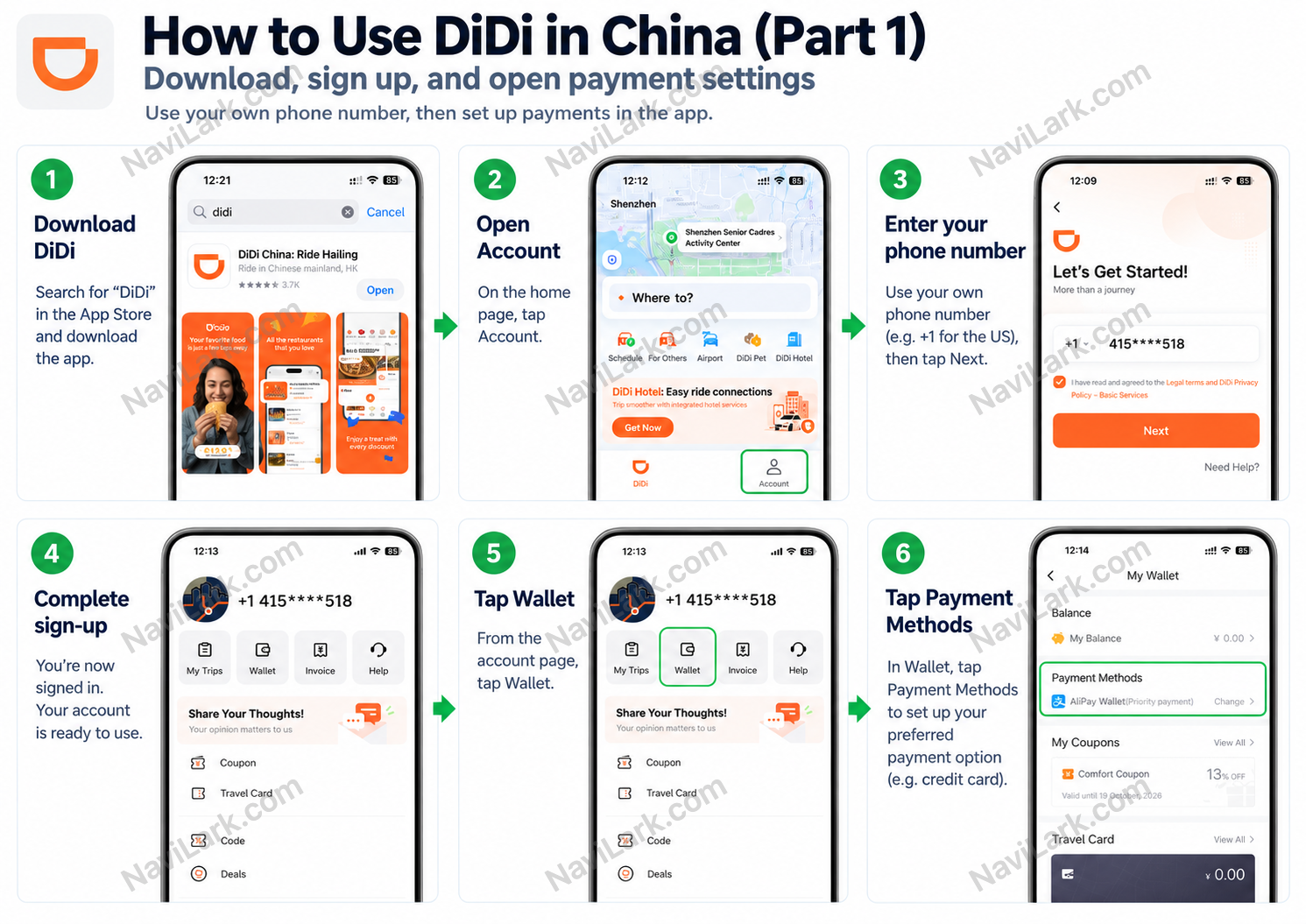
Download DiDi from your phone’s app store, then open Account on the home screen. Select the country or region for your phone number, register with your own number and complete the verification requested by the app.
Once you are signed in, go to Wallet → Payment Methods to view and set up your payment options.
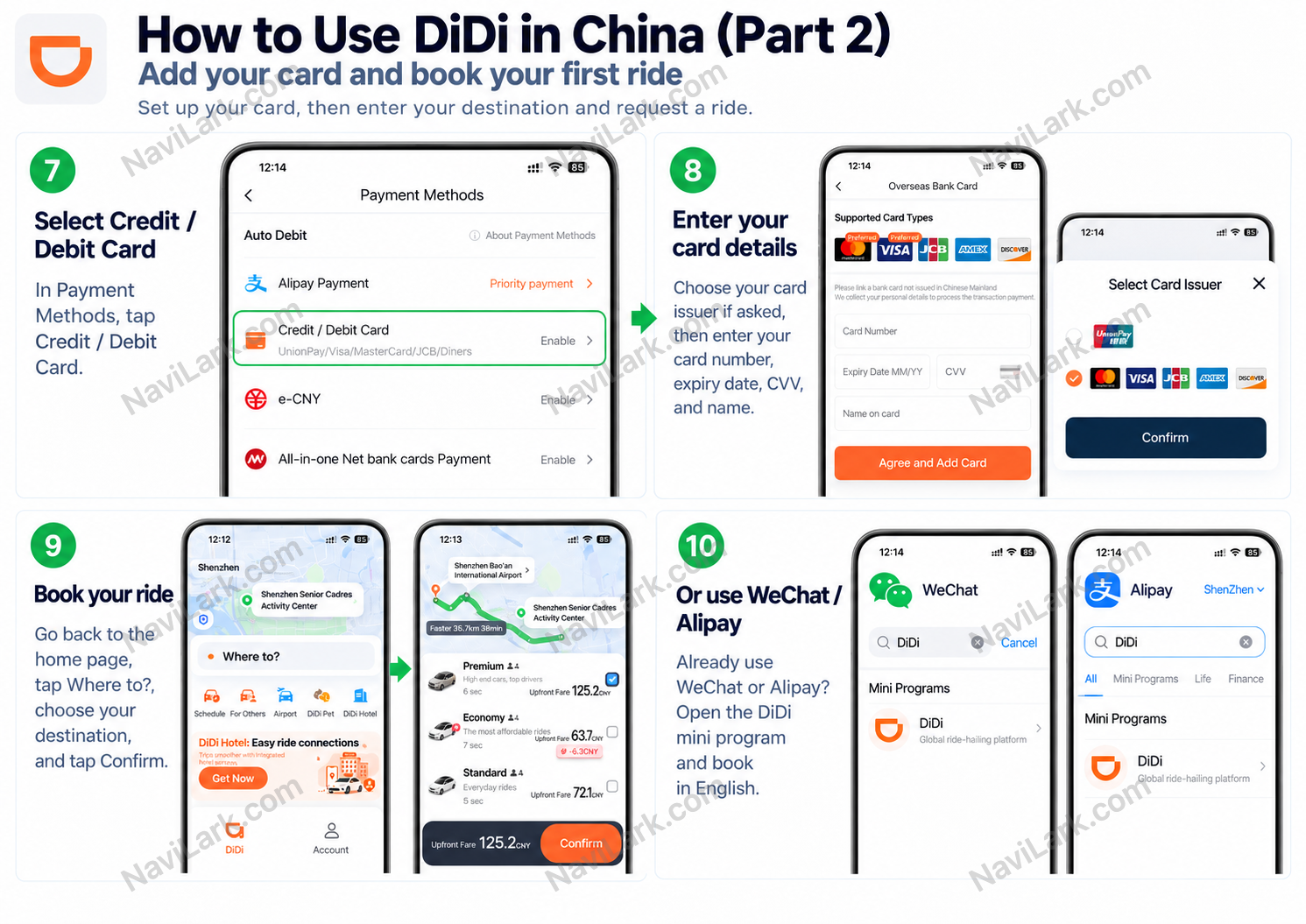
In Payment Methods, choose Credit / Debit Card before entering your card details. Complete any checks requested by DiDi or your bank.
To request a ride, tap Where to? on the home screen and enter your destination. Check the exact pickup point, vehicle type and quoted fare before confirming.
A pin on the wrong side of the road can leave your driver facing a long detour. Before requesting a ride, zoom in and check the entrance and the side of the street where you will wait, especially on roads with a central barrier.
Choose a specific pickup point rather than just a building name: the hotel’s main entrance, Exit A of a metro station, a convenience store or an attraction’s east gate. Use a recommended pickup point if one is shown and the driver can stop there safely. Wait at that spot, send the landmark to your driver and let them know if you move.
If you do not share a language, a short message is usually easier than a phone call. DiDi’s English app translates text messages between English and Chinese. Try “Waiting outside Starbucks,” adding the exit number or shop name so your driver knows exactly where to look.
If the chat has an image button, you can also send a photo of the sign or entrance beside you. The available features may differ in mini programs.
Match the license plate, car model and color to your booking before getting in. Your driver may ask for your “wei hao,” meaning the last four digits of the phone number used for this ride. This is a passenger check, not an SMS verification code.
Save those digits in a note and show the screen if that is easier than saying them.
Check the pickup directions in DiDi, then follow signs to the designated ride-hailing area. Do not assume the departures or arrivals curb is a pickup point. The meeting area may be inside a parking garage, so check the terminal, level and zone, or ask staff for help.
Once there, send your driver a nearby zone or pillar number, such as “Area B, Pillar 16.” Follow the local signs and keep clear of no-stopping areas.
With an eligible card or digital wallet linked and automatic payment enabled, the fare is charged at the end of the ride. You do not need to pay the driver in cash. After getting out, open the bill and make sure it shows as paid.
If the payment fails or the fare is still outstanding, follow the payment prompt in DiDi. Trip records, payment receipts and tax invoices for expenses can be viewed or requested through the trip details.
📲 Add to home screen — we'll cache key pages so you can browse offline in China
📲 Add to home screen — we'll cache key pages so you can browse offline in China
COMING SOON
We're organizing transport, attractions, payments, healthcare, and safety tips for __CITY__. You can explore the open Shenzhen guide first while more cities are added.