
Alipay Metro Code

Activate the metro code for your current city first, then use the same QR code to enter and exit. Switch the city again when you travel onward.

Example: Shenzhen

When traveling in China, taking the metro and buses is highly convenient—though the payment methods may differ from those used in many other countries. In most Chinese cities, public transportation accepts mobile QR code payments. To ride, simply open the transit QR code on your smartphone and scan it at the metro gate or the scanner onboard the bus.

Common transit payment options include physical transit cards, bank cards or mobile NFC, and transit QR codes generated by mobile apps. For international visitors, mobile transit QR codes are often the most convenient option, as they eliminate the need to purchase a physical transit card or carry cash for fares.

In China, Alipay is one of the most widely used payment platforms. It supports not only shopping, dining, and ride-hailing, but also transit QR codes for buses and subways in many cities. For international visitors, Alipay offers the advantage of consolidating everyday payments and travel needs into a single app—reducing the hassle of downloading multiple local apps or purchasing physical transit cards.
Please note that transportation systems vary across different cities in China, and each city may require its own transit QR code. Below, we use Shenzhen as an example to demonstrate how to activate and use the Shenzhen transit QR code in Alipay.

Guide Steps
  1. 1. How to Activate the Shenzhen Public Transit QR Code
  2. 2. How to Use the Transit QR Code to Ride Public Transport
  3. 3. Important Notes When Using in Different Cities
  4. 4. What should I do if the QR code cannot be scanned?
  5. 5. Practical Tips and Important Notes
  6. 6. Summary
1

How to Activate the Shenzhen Public Transit QR Code

Alipay Metro Code

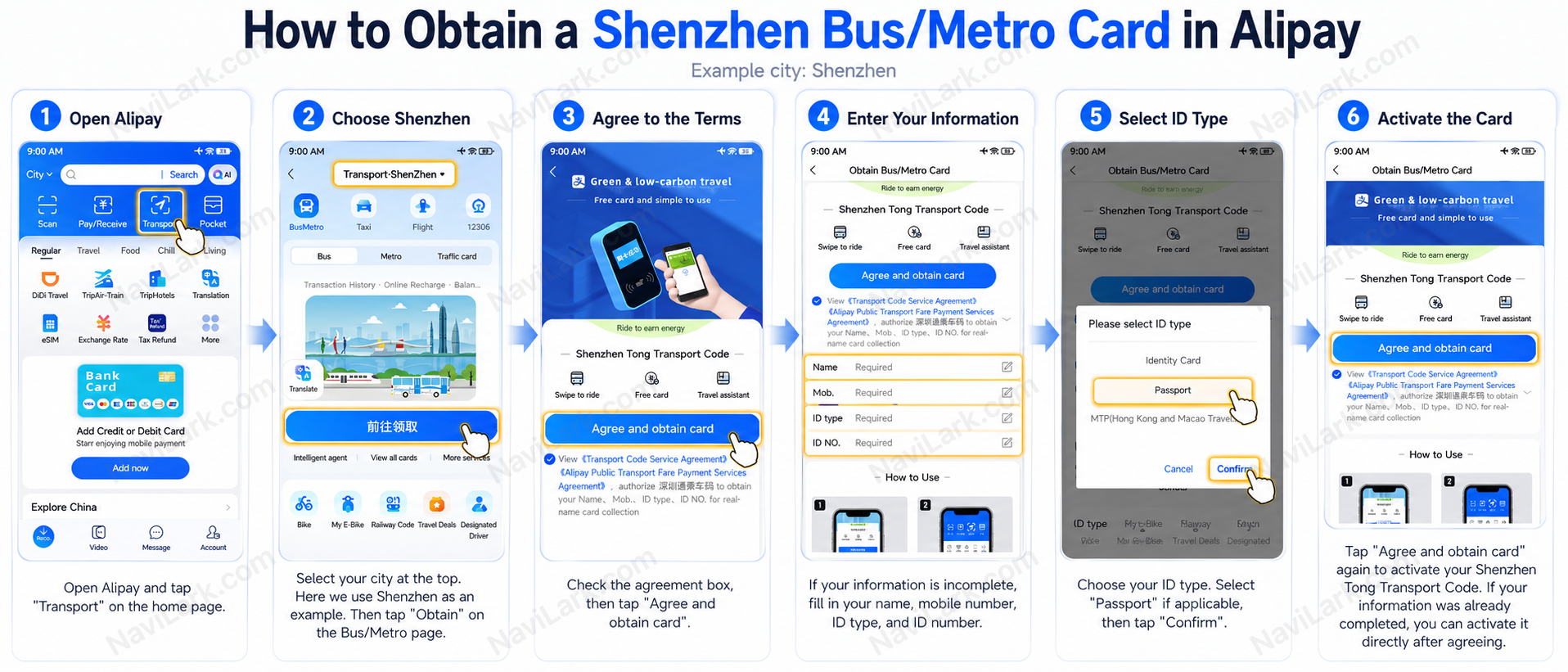
You can follow the steps shown in the image above to activate the service: Open Alipay, go to the Transport section on the home screen, confirm that the city is set to Shenzhen, then tap “Get Transit Code” on the Bus/Metro page. On the activation page, select the agreement and click Agree and obtain card.

If you’ve already completed your identity information in Alipay, activation is usually instant.

If the system prompts you to provide additional personal details, enter your name, mobile number, ID type, and ID number. International visitors typically select Passport as the ID type. After completing the form, click Agree and obtain card again to finish activation.

Please note: Button labels and page layouts may vary slightly depending on your Alipay version or selected city. If you’re not in Shenzhen, first switch to your current city using the city selector at the top of the page.

2

How to Use the Transit QR Code to Ride Public Transport

Alipay Metro Code

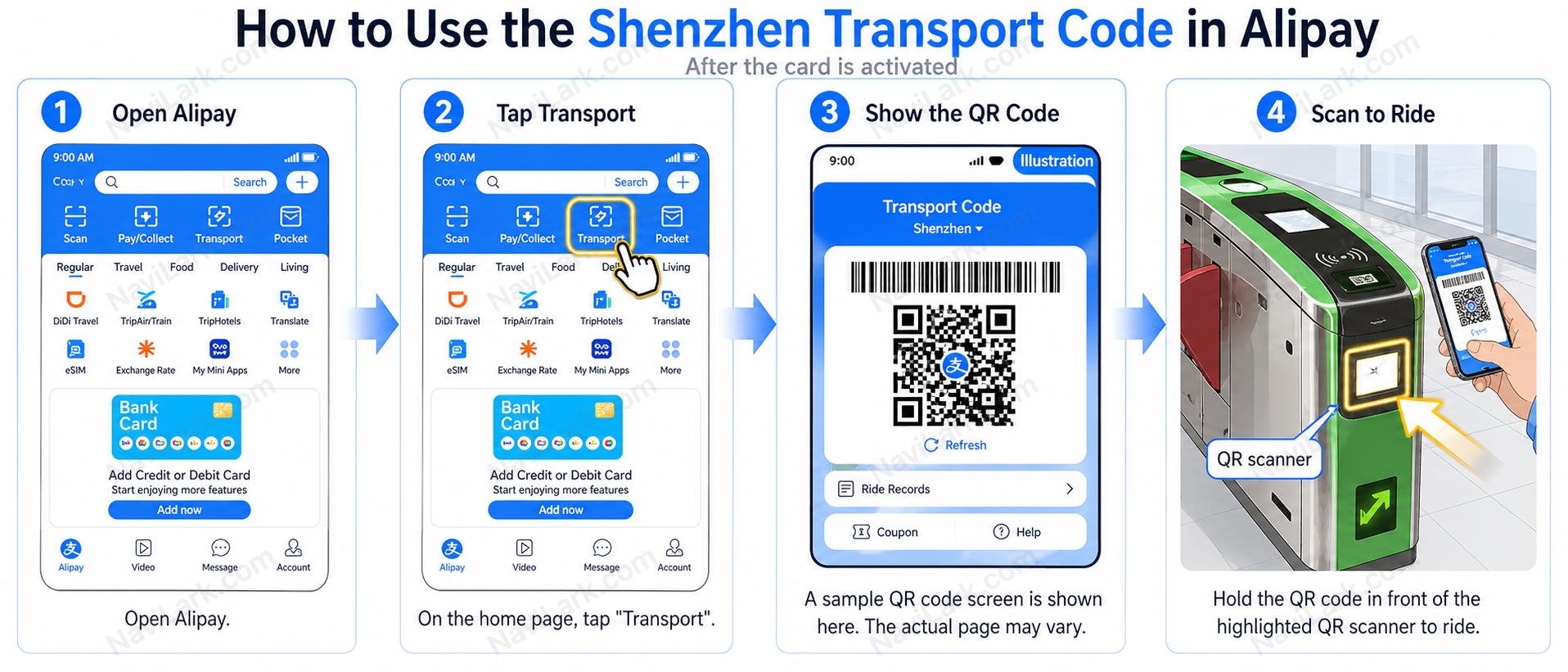
Once activated, you won’t need to repeat the setup for future rides. Simply open the Alipay homepage and tap Transport; the transit QR code will then appear on-screen.

When riding the metro or bus, align the QR code displayed on your phone with the QR code scanning area on the device. Be sure not to point the QR code at the standard card-swiping zone—gates often feature both a physical card reader and a QR code scanner. Instead, aim the QR code at the illuminated or clearly marked scanning window.

If the scan succeeds, the metro gate will open, or the bus device will confirm successful boarding.

Exiting the metro follows the same process: open the Alipay homepage, tap Transport, and scan the QR code to exit. For buses, no additional scan is required—just disembark.

3

Important Notes When Using in Different Cities

Although the operational logic of Alipay is largely consistent, the name of the transit QR code may vary by city. For example, it might appear as Transport Code, Bus/Metro Card, Metro Code, or Ride Code.

If you’re traveling from Shenzhen to another city—such as Beijing, Shanghai, Guangzhou, or Hangzhou—we recommend first opening Alipay’s Transport page and checking whether the city displayed at the top has been updated to your current location. In some cities, you may need to re-enable the local transit QR code.

4

What should I do if the QR code cannot be scanned?

If the turnstile or bus device fails to scan the QR code, try the following:

  • Click Refresh on the page to generate a new QR code
  • Increase your phone’s screen brightness
  • Ensure the entire QR code is fully visible
  • Hold your phone close to the QR code scanner—but not too close
  • Verify that your phone has a stable internet connection
  • Confirm that the correct city is selected
  • Make sure you’re aligning the QR code with the QR code scanner—not the physical card swipe area
5

Practical Tips and Important Notes

Activate in advance—don’t wait until you’re at the station: Initial activation requires an internet connection, and signal strength may be weak near subway station entrances. We recommend completing activation in advance using your hotel’s Wi-Fi.

Screenshots won’t work: The QR code for boarding refreshes dynamically; screenshots are invalid. You must open the app to generate a live QR code.

Ensure sufficient battery power: Scanning is required both when entering and exiting the station, so keep your phone adequately charged.

Backup options: If you’re unable to activate the QR code, you may purchase a single-journey paper ticket from a self-service ticket machine at the station, or visit a staffed counter to buy a prepaid transit card.

6

Summary

For foreign visitors, Alipay is an extremely practical tool for getting around China. Through Alipay’s Transport feature, you can activate transit QR codes for buses and subways in many cities—simply display the QR code when boarding.

This article uses Shenzhen as an example to demonstrate two processes: how to activate the Shenzhen transit QR code, and how to use the QR code to ride buses or subways. While the interface may vary slightly across cities, the core steps remain the same: Select City → Activate Transit QR Code → Display QR Code → Scan at the designated device to board.